Find the Right Tutor & Learning Support for You
Discover tutors, academies and learning opportunities that match your class, subject, learning mode, budget and schedule. EduFocus helps students and parents find the right learning support and stay connected throughout the learning journey.
- Tutors for all classes & subjects, including K-12 academics, competitive exams, and specialized skills.
- Review tutor information, experience and subject expertise where provided.
- Explore demo class options where offered by tutors or academies.




Approved
Public Tutor Profiles
3 Modes
Online, Offline & Hybrid
Live
Classes & Demo Sessions
Linked
Guardian Visibility
Why Students & Parents Choose EduFocus
EduFocus makes it easier to discover learning support, connect with tutors and academies, and stay organised throughout the learning journey - all from one education platform.

Detailed Tutor Profiles
Explore relevant information about a tutor's experience, expertise and teaching approach before connecting.

Smart Search & Filters
Narrow your search based on subject, class, location, learning mode, budget and other available requirements.

Demo Classes
Explore demo class options where offered by tutors or academies.

Flexible Learning Options
Choose from available online, offline and hybrid learning opportunities.

Parent & Guardian Access
Help parents and guardians stay connected with important parts of their child's learning journey.

Learning & Fee Tracking
Keep relevant learning activities, attendance, progress and fee information organised in one place.
Find. Compare. Connect. Learn.

Find
Discover tutors, academies and learning opportunities based on your subject, class and requirements.

Compare
Explore profiles, expertise, learning modes, fees, experience and other available information.

Connect
Connect with the tutor or academy that best matches your learning needs.

Start Learning
Book a demo or get started with classes where the option is available.
Track Your Learning
Keep track of classes, attendance, homework, learning activities and progress.
Find Tutors Across Subjects
Explore tutors and learning support across a wide range of academic subjects and learning requirements. Find the right expertise for your class, subject and learning goals.
 MathematicsScienceEnglishPhysicsChemistryBiology
Everything You Need for Better Learning
From finding the right tutor to managing your learning activities, EduFocus brings useful learning tools and support together in one place.

Scheduled Classes
Keep your classes and learning schedule organised.

Learning Materials
Access and manage relevant study materials and learning resources.

Homework & Feedback
Stay on top of assignments, homework and feedback throughout your learning journey.

Guardian Access
Help parents and guardians stay connected with the student's learning journey.

Attendance & Progress
Keep track of attendance, learning activities and progress where available.

Fee & Payment Tracking
Keep relevant fee and payment information organised in one place.
Meet Your AI Tutor
Meet Your AI Tutor
Learning support whenever you need it. Stuck on a difficult concept? EduFocus AI Tutor helps you understand concepts, ask questions, practise and revise at your own pace.
Understand Better
Get concepts explained in a simple, step-by-step way.
Ask Your Questions
Get help when you're stuck and explore follow-up questions.
Practise & Revise
Strengthen your understanding through practice and revision.
AI Tutor is a learning aid. Important answers should also be checked with your tutor or course material.
Explore AI Tutor
A Connected Learning Experience
EduFocus connects students and parents with tutors and academies, making it easier to discover learning opportunities, connect with the right people and stay organised throughout the learning journey.
Find the right support. Learn with confidence. Stay connected.
EduFocus App Coming Soon
The EduFocus App Is Coming Soon
Your EduFocus learning experience is coming to mobile. Stay connected with your classes, learning materials, progress, AI Tutor and more - wherever your learning takes you. Store links become active when the respective app is released.
 Coming soon onApp Store
 Coming soon onGoogle Play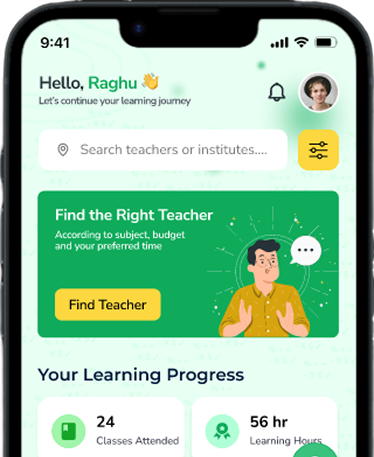
We're here to help
Need Help Finding the Right Learning Option?Edufocus
Have a question about finding a tutor, exploring an academy, AI Tutor or the EduFocus platform? Get in touch with us and we'll help you find the right information.
Get In Touch
Ask about student or guardian access, tutor onboarding, academy partnerships, learning features, or payments.
Email Support
support@edufocus.in
Learning Support
Students and guardians
Partner Support
Tutors and academies

Students Support
Teachers Support
Institute Partnership
Payment Assistance
Send Us A Message
Frequently Asked Questions
EduFocus is an education platform that connects students and parents with tutors, academies and learning opportunities. It helps users discover suitable learning options and stay connected throughout their learning journey.
One Organised Learning View
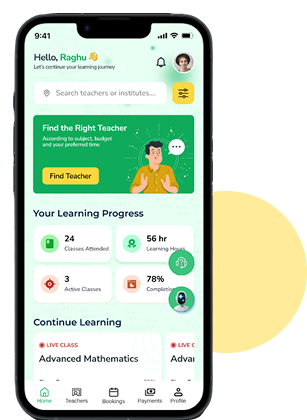
Your Student Workspace
Keep sessions, homework, shared materials, attendance, progress, payments, and available conversations easy to find.
Ready to Find the Right Learning Support?
Explore tutors, academies and learning opportunities that match your needs. Start your learning journey with EduFocus.